Skip to content

Posts tagged ‘distance learning’

Distance Learning: Managing the Online Writing Conference

By Nicole Coppola

Online writing conferences are providing meaningful and important learning experience for my students and me as we write fantasy stories.  Students who normally do not participate in my online classes are joining my small-group conferences.  One of the biggest challenges for me was how to initiate and manage the online conferences.  When do I set up the conferences? How? How long are the conferences?  What is covered during the conferences?  Do I track attendance and how? What about feedback?

In addition to virtual classroom lessons, I am scheduling small group or individual conferences on Zoom.com for 15 minutes, two to three hours on Tuesdays, Wednesdays, and Thursdays. Once the schedule was established, I looked at several different websites and programs to allow students to sign up.  It seemed too cumbersome to have students create another log-on and password, so I explored all the Office 365 platforms. With the support of a district tech coach, I set up a sign-up sheet on FORMS with specific time slots and posted the sign-up link on my CANVAS homepage. See the message in Canvas below.

“Please plan to attend a writing conference once every two weeks.  
Next week – please sign up for a writing conference for the week of 5/11/20 using the Forms link.”

I did not set a limit for the number of students in each conference slot.  That is working out because, inevitably, some students do not show up.  Students are requested to show up to a conference once every two weeks, but they are welcome to sign up for multiple conferences, as many as they would like.  Both the parents and students seem to appreciate this flexibility and access. 

As on online assessment the week before the conferences, the students had to brainstorm about their stories. During the conferences (which usually have 2-5 students), I screen shared the assignment, so all students had a moment to read about the other student’s story.   After giving a specific compliment, I asked the student a question to get them talking. The other participants were encouraged to ask questions or give a compliment. This worked really well because the “research” part of the conference was already written.  This saved time and enhanced engagement because everyone was looking at a copy of the story together.  Students were encouraged to take conference notes about their stories. For students with special needs, I typed them an e-mail reviewing the conference as it happened.  This way, both student and teacher have the same notes about the conference for future reference. 

Going forward, I am planning specific assignments with the intention that I can access the assignment and share it during the conference. Small group conferences have been the most rewarding part of my online teaching.

Call for Distance Learning Blog Posts

The PAWLP Blog would like to hear from you! What does distance learning look like for you, your students, and your school district? What digital programs are you using? What lessons have you tried out? What routines and expectations are you establishing?

Blog posts will be featured in our Distance Learning column each Monday. Please email the PAWLP blog if you are interested or would like to find out more information.
Distance Learning: Creating Digital Reading Conferences in Canvas

by Anna Gabriel

There are few sounds as precious as pure silence in the classroom. While our room usually buzzes with students chattering to one another—reading aloud, sharing important passages, offering analysis—the first 10 minutes of every class period is reserved for independent reading. During this time, silence is preserved; students are immersed in their own worlds, speechlessly anticipating the next plot twist. The steady hum of the projector is all that can be heard.

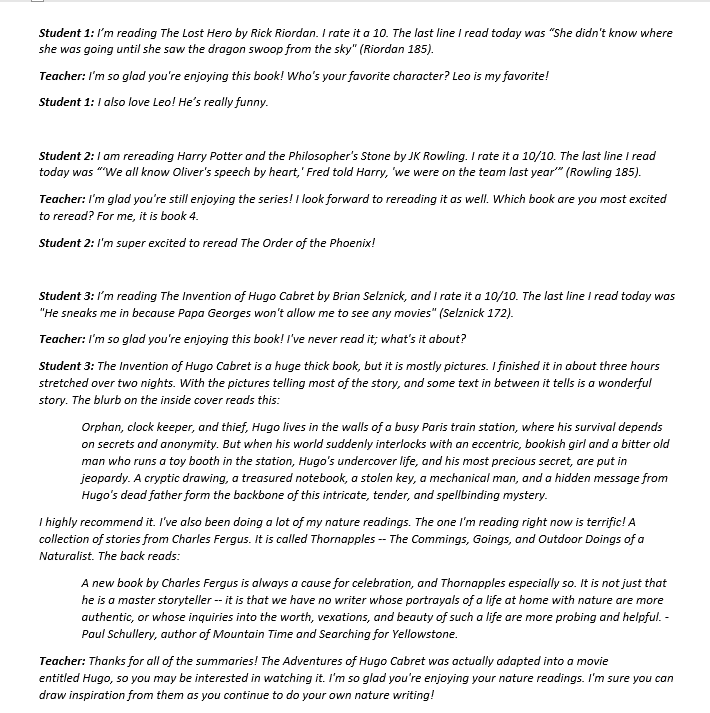
I must admit that it is not my students, but rather myself, who ultimately loses the quiet game every day. While my students are busy flying around Hogwarts, playing capture the flag at Camp Half-Blood, and raging a rebellion against the Capitol of Panem, I am busy facilitating individual reading conferences. I walk around the room, pull up a stool next to a student, and record their book title and page number on my clipboard. After recording the data, the real fun begins, as we engage in an authentic discussion about their independent reading book. Some of my favorite questions to ask during a conference are:

  • What’s going on in your book right now?
  • What has been the most exciting moment in your book so far?
  • On a scale of 1-10, with 10 being the best, what would you rate this book and why?
  • How does this book compare to your last one? What makes it better/worse?
  • Who is your favorite character and why?
  • What are you planning on reading next?

I also use conferencing time to make book recommendations, expand my own knowledge of YA literature, and generally check in with each student. I value my conferencing time because—in addition to igniting my students’ interest in reading—it allows me to have a differentiated conversation with each student. At the end of each week, I can proudly state that I have had at least one one-on-one conversation with every single one of my 100 students.

The importance of allowing students time to read independently in the classroom has been proven time and time again by teacher-author superstars such as Penny Kittle, Kelly Gallagher, and Nancie Atwell. The 10 minutes of independent reading in my classroom is sacred; every now and then throughout the school year, I have to relinquish this time due to two-hour delays, standardized testing, what have you. The few times where I do this prompts a chorus of sighs and groans and “NO.”

So, when faced with the multiple challenges of distance learning, the barrier that posed the most threat to my classroom environment was the loss of my independent reading conferences. How am I supposed to ignite a love of reading if my students are not setting aside time to read every day?

I found my savior in Canvas individual discussion boards. Every week, my students are expected to log on to Canvas and complete the week’s modules in order. The first two modules are labelled “Independent Reading” and “Independent Reading Check-In.” The first module is a timed 10-minute quiz, in which students are asked to pause and read their independent book until the timer runs out. Next, students move on to an individual discussion board between the two of us. These discussion boards function similarly to any online instant messaging platform. Every week, students are asked to post to the individual discussion board by responding to a few questions.

I change the exact directions each week, but students are always asked to share their book title and author and their current page number. This allows us to keep a running log of the student’s reading progress, just as my clipboard does in class. I respond to every student’s post by the end of the week, commenting on what they shared, asking questions about their book, and sometimes offering future book recommendations. Having the book recommendations solidified in the discussion is useful because every time that student needs a new book, we can easily scroll up and find a selection that I have previously curated for them. 

Recently, I have been asking students to leave short video/audio messages sharing their book title, author, page number, and the most important moment from the day’s reading. I respond with my own audio message, again attempting to mimic our in-class conferences as closely as possible. It has been heartwarming to hear their voices; it is almost like we are back in the classroom, having a real face-to-face conversation! In their video this week, one student read their favorite poem from Rupi Kaur’s Milk and Honey and then offered their analysis of the poem (without being asked to do so)!

Below are examples of my conversations with students:

While I miss our in-person conferences, Canvas conferences via the individual discussion boards allows me to accomplish the same goal as my in-person conferences. By the end of the week, I have had a one-on-one discussion with every single student.

After reading and reflecting on Lauren Foley’s “Rediscovering Routines” post, I realized that our students are also missing the rhythms and routines of the classroom. By mimicking our in-class routine via Canvas, I am providing my students with some semblance of the structure they are missing. They are asked to pause for 10 minutes and then engage in a one-on-one conference about their reading, just like they would be asked to do in our physical classroom.

Completing our conferences in the Canvas individual discussion boards has also allowed me to better track each student’s progress, as I am no longer solely relying on my clipboard. It has also allowed students to better track their own progress. Moving forward, I plan to continue using this space to have students track their reading, even on the glorious day that we return to the physical classroom. It will also be a space where I recommend books to them, and they can check back at any time to find their personal playlist of books.

These discussion boards are just one way that my future in-person instruction has been enhanced by distance learning. Even though this has been a challenge, teachers and students will emerge from distance learning with a brand-new skill set for the future.

Call for Distance Learning Blog Posts

The PAWLP Blog would like to hear from you! What does distance learning look like for you, your students, and your school district? What digital programs are you using? What lessons have you tried out? What routines and expectations are you establishing?

Blog posts will be featured in our Distance Learning column each Monday. Please email the PAWLP blog if you are interested or would like to find out more information.

Edit this

Distance Learning: Online Teaching

by Nicole Coppola

Online teaching can be challenging.  One piece that has worked for me is maintaining a routine.  My virtual lessons follow the same format that my classroom lessons did–a warm up, a lesson that includes review, goals, and teacher modeling of the concept.  Then, there is an independent assignment. 

In my district, we use CANVAS, an online teaching platform.  My video lessons, recorded on Zoom.com, often include MS PowerPoints because there is an option to add recordings over the slides.   With Zoom, there is a screen share option, so the teacher can interact with documents and preview the online assignments.  Another helpful tip is that other teachers have added me as an observer to their teacher pages, so I can see how my colleagues are using resources and creating lessons.

My teacher page also includes an OPTIONAL Pandemic Journal Project. By opening a discussion board with several prompts, the students have the option to write about their personal experiences or not.  The next step for me is to create virtual conferences and peer group discussions using my district resources.  Online teaching is still a work in progress for me, but I am adjusting to the change.

Call for Distance Learning Blog Posts

The PAWLP Blog would like to hear from you! What does distance learning look like for you, your students, and your school district? What digital programs are you using? What lessons have you tried out? What routines and expectations are you establishing?

Blog posts will be featured in our Distance Learning column each Monday. Please email the PAWLP blog if you are interested or would like to find out more information.

Distance Learning: Reflecting on Pandemic Priorities

By Courtney Knowlton

Back in mid-March my principal sent an email  entitled, “Emergency Staff Meeting at 3:15 pm.” It was a jarring phrase to read in the middle of an otherwise ordinary day. The purpose was to let us know that students would be off the following Friday and Monday, so we could prepare ten days worth of plans for distance learning. Little did we know that Thursday would be the last time this school year that the students gathered at the front doors of our school and we would need distance learning plans for much, much longer than ten days.

That Friday I sat in a classroom with my colleagues to develop a preliminary plan, and for the last four weeks we have taught our students from a screen. One of the most challenging parts of designing this online learning experience was sifting through the bombardment of resources. I received over 40 emails touting “virtual offerings” and “free access due to school closures.” The distance learning paradox is that I seem to have an unlimited supply of free resources, but I have a much more limited amount of time to interact with my students on a weekly basis. It felt overwhelming at first, but I discovered a process that helped to make the best of these challenging times.

When visualizing how to reach students virtually, it helped me to brainstorm a list of priorities. Here is my list so far:

  1. I want to show students that I care using whatever means necessary, whether we connect by video chat, phone, or mail.
  2. I want to develop something that my students can depend on, since they are dealing with so much change.
  3. I want to incorporate elements that my students are familiar with to give them a sense of comfort.
  4. I want to give students choice during a time that they may feel that so much is out of their control.
  5. I want to use technology to my benefit to give students more one-on-one time and specific feedback.
  6. I want to find ways for students to interact with each other. 
  7. I want to assess students with high expectations, but also with flexibility and understanding knowing they have different levels of accessibility and different home situations.
  8. I want to remember to think about my own health and wellness and try to maintain a work life balance.

Throughout March and the beginning of April I have tried to keep these priorities in mind when creating my Google Classroom. So far, I would say I have been most successful with 1, 2, and 5, and honestly 4, 6, and 8 have been quite a struggle. For me, it was an act of inquiry. I would try something, see how my students responded, and adapt accordingly.

Regarding connecting to students, I learned most of them could be reached using the announcement page on my Google Classroom or via messaging their parents on Class Dojo.  Thankfully my school was able to give out Chromebooks and once all the students had access to the technology, the best way to explain how to use it was by inviting them to a video chat and sharing my screen with them. Then, I could model how to navigate the site. I learned to be patient. At first hardly any students attended the chat, but over the weeks more and more logged in. Video chats were also a great way to bring a little fun into our situation. For example, we did one to sing happy birthday to a student, and I found an old party hat and bright pink noise maker in my basement that made the students laugh. 

To create something the students could depend on, I consistently provided information for them and their parents on our Google Classroom. At the beginning of the week I posted a grid organized by day number with a numbered list of work. Then, within the assignments tab, I titled each assignment using the format: Week #, Day #, Description. When the students clicked on the assignment they found two resources. The first was a video that I made using Screencastify. Each video showed my computer screen, while I explained the directions for the assignment. The other resource was their own copy of a Google Doc that I created for them to submit their thinking. Sometimes after checking the students’ work, I realized my weekly plan needed to be tweaked.  If this happened, I would add CHANGE IN PLANS to the assignment title. Even though the work was different week to week, I found that keeping these elements consistent helped to minimize the amount of questions I was receiving for how to complete it.

Over the next few weeks, I will continue to look for guidance with my priorities. Attending Zoom meetings with my professional communities has made me feel more grounded and better equipped to handle teaching from home. In some ways this shift to distance learning has made me feel more alone, but in other ways it has given me new ways to connect with others on a global level.

Call for Distance Learning Blog Posts

The PAWLP Blog would like to hear from you! What does distance learning look like for you, your students, and your school district? What digital programs are you using? What lessons have you tried out? What routines and expectations are you establishing? How are you finding a balance?

Blog posts will be featured in our Distance Learning column each Monday. Please email the PAWLP blog if you are interested or would like to find out more information.

Distance Learning: Establishing a Work Completion and Grading Policy

By Lauren Heimlich Foley

The last few weeks have felt like a whirlwind blend of late August preparation and early September go time. The amount of new information, last minute changes, and not knowing what tomorrow will bring makes me thankful that I usually only experience the strain of back to school once a year.       

Now in the throes of distance learning—with a scheduled meeting time for each class, priority standards in place, expectations for online behavior, and a revised year-long reading and writing map—one more item came up in my eighth-grade team’s text message thread: a work completion and grading policy.

At the middle grades level, students have a two-and-a-half-hour block of time each week for each class. (First and second period meet on Monday, third and fourth period meet on Tuesday, fifth and sixth period meet on Wednesday, seventh period meets on Thursday. Thursday and Friday offer additional office hour time and independent work time.) During that class period time, teachers are available for real-time virtual office hours, whole-group meetings, small-group meetings, and one-on-one conferences. There is a thirty-minute lesson with up to an additional sixty-minute long-term assignment. Although students are encouraged to complete the work during their period’s time slot, home and personal obligations may make this impossible for students to do. While all students have access to a laptop through our district’s 1:1 initiative, our students have varying levels of responsibilities at home. To help students be as successful as they can be and stay on top of their work, we are asking students to complete each week’s assignments before our next scheduled class time. With our district moving to a Pass/Fail option for the fourth marking period, we want to ensure that our students have the time, guidance, and help to be successful.

Like the start of any new school year, I needed to establish routines and expectations. I have started to do this with Canvas, our learning management system, by maintaining certain key components of our class and creating new routines like our Office Hours One-on-One Discussion Board. Our district asked teachers to develop class guidelines by explaining how distance learning would work within their own classroom. And, while we have a district-wide Pass/Fail grading system in place, my students and their parents needed more information on how this translated to our English classroom.

The science teacher on our eighth-grade team made a grading letter, outlining the expectations and guidelines for distance learning. With a few content-specific tweaks, I adapted it for my English classroom. First, we sent an email blast to all students. Next, we sent an email blast to all parents and guardians. See the emails below. By sending out an email that genuinely hoped students and families were doing well while simultaneously offering insight into how the rest of the school year would work in terms of work completion and grading forged a we-are-working-together-and-we-will-get-through-this bond. Being transparent and upfront with parents and guardians and showing I care for the well-being and success of their students has helped me maintain positive parent-guardian relationships. I sent out the email on Thursday, and I have already received two positive emails in reply.

Although I would like to think the letter will ensure all students turn in their work on time the first week, I know I will have missing work. Being flexible will also be an important part of making this grading policy work. Monday, April 24th will mark a complete, one-week cycle for all classes under our district’s Phase II of Distance Learning and of our new grading policy. For students, who have not turned in work that first week, I will reach out to students and their parent and guardians. Although my grading policy says work turned in late will be marked as failing, I will be flexible this first week, allowing a grace period to ensure everyone is on the same page and understands the expectations.

With the announcement that schools will not be returning to our physical classrooms this 2019-2020 school year, specific guidelines and a little extra TLC—for me, for my students, and my parents and guardians—will help us make it through.

Call for Distance Learning Blog Posts

The PAWLP Blog would like to hear from you! What does distance learning look like for you, your students, and your school district? What digital programs are you using? What lessons have you tried out? What routines and expectations are you establishing?

Blog posts will be featured in our Distance Learning column each Monday. Please email the PAWLP blog if you are interested or would like to find out more information.

Distance Learning is the new Bike Riding

By Lauren Heimlich Foley

I remember, a spring day much like today, I learned to ride my bike. Taking off the training wheels, left me feeling unsteady. Somehow, the uneasiness pushed me forward, and eventually all of the teetering and balancing paid off. With lots of practice and my dad’s help—and patience—I found the freedom of the open road.

The last three weeks of teaching remind me of when my training wheels came off. I have been trying to find a balance between home life and work life while learning best practices of distance learning through virtual meetings.

With this new teaching format, I wanted to get my students feedback and see how things were going on their side of the computer screen. After one week, I asked them the following questions:

  1. What assignment, activity, or aspect of English distance learning have you enjoyed the most? Why?
  2. What assignment, activity, or aspect of English distance learning can I improve? How?
  3. What is your preferred method of communication with me: Canvas assignment comments, Canvas discussion boards, email, Teams messenger, Teams phone call? Why?
  4. What about distance learning has been the biggest hurdle?
  5. What about English distance learning has been easy and/or have you enjoyed?
  6. What about distance learning surprised you?
  7. Is there anything else I should know?

I choose one specific area of feedback to focus on—preferred method of communication—because so much of our class depends on one-on-one and small-group conferencing.

Although I tried giving feedback on assignments in our learning management system (LMS), my students shared that it was difficult for them to find the feedback and respond to me. The first week ‘conferences’ ended up being mainly one-sided. Although email was a viable option, my students and I receive so many emails throughout the day that it would be difficult to keep track of so much mail. However, they liked how email made it easier to have a ‘conversation.’

I was not sure what to do with their feedback. I knew Microsoft Teams was an option for virtual meetings, but the chat feature would not provide the one-on-one interaction my students and I needed. While walking one beautiful day, I came up with the following idea: create one-on-one discussion boards.

In school, I use discussion boards for whole-class sharing and small-group publication, but I never used them for one-on-one conferencing. If you have a discussion board feature in your LMS, check to see if you can create something similar. Instead of creating groups with multiple students, I created a discussion board with only one student in it. The discussion board essentially works like text messages, offering a place for students to chat with me during our class period and throughout the week. There is a reply button that we both use to keep the conversation going. We meet virtually on the discussion board, and I can provide differentiated instruction. I have answered questions, clarified directions, offered feedback, and suggested books. The discussion board is the closest thing to re-creating our one-on-one conferences. And, they are working! During a second round of feedback, students shared that they like being able to talk to me without the entire class seeing what they said. Their answers also confirmed that they like the discussion boards because they offer live feedback from me and are easy to find and reply to. All in all, these discussion boards have become a reliable, ongoing source of communication.

For next week, I am working on re-creating students’ small-group and table-group conversations through Microsoft Teams. Students are filling out surveys that ask them whether they would like to have a small-group chat about their writing piece or book or have time to share with their table group. I hope this new tool helps students collaborate and receive additional feedback.

Many days I feel like a first year teacher again. So many aspects of distance learning are brand new. In theory they work, but I have to figure out what works best for my students and for me. Getting their feedback on conferencing and discussion boards helped me to find a sense of certainty amid the unknown.

I am trying to embrace the unsteadiness of distance learning like the first time I rode my bike without training wheels. Through it all, I keep reminding myself to experiment and breathe. Chatting with my students, reading their writing pieces, and talking about books has brought me joy during a crazy time. I owe this happiness to my students’ honesty and the one-on-one discussion boards. I hope you are finding the right technological tools for you and your students.

Call for Distance Learning Blog Posts

PAWLP would like to hear from you! What digital programs are you using? What does distance learning look like for you, your students, and your school district? What is bringing you joy? What technological tools are you using?

Please email the PAWLP blog if you are interested or would like more information.